Generative AI is transforming the fashion industry by enabling brands to create lifelike designs and visuals in minutes. Instead of relying on traditional photoshoots or lengthy design processes, tools like Mock It AI allow clothing brands to produce professional-grade mockups, marketing visuals, and prototypes efficiently and affordably. Here’s what you need to know:
- What It Does: Generative AI converts text descriptions or sketches into detailed images. For fashion, this means creating realistic clothing designs, complete with fabric textures and folds, without physical samples or models.
- Why It Matters: AI reduces product development time by up to 95%, lowers photoshoot costs (from ~$2,000 to ~$20 per image), and helps brands cut overproduction by up to 30%, addressing cost and sustainability challenges.
- Key Tool: Mock It AI offers a platform tailored for apparel brands. Features include customizable digital models, 3D fabric mapping, and tools like an AI Moodboard Generator and Virtual Dressing Room. Plans start at $12/month.
- Benefits: Faster design iterations, high-quality marketing visuals, and significant cost savings. For example, brands like Victoria’s Secret and Caleres have seen boosts in conversion rates and revenue using AI-generated content.
Generative AI is a game-changer for clothing brands looking to streamline workflows, reduce costs, and create polished visuals without traditional constraints.
Benefits of Generative AI for Clothing Brands
Speed Up Design Iterations
Generative AI transforms the design process by reducing the time needed for sketching and pattern-making from weeks to mere seconds. For instance, you can create realistic images in under 30 seconds and explore multiple design variations in the time it would traditionally take to develop just one physical prototype.
Take Mock It AI as an example. Its AI Moodboard Generator compiles visual inspirations, color palettes, and textures into unified boards, while the AI Virtual Dressing Room simulates how garments fit and move in different environments – all without needing physical prototypes. This digital approach not only streamlines the process but also reduces sampling waste by nearly 60%, helping brands minimize overproduction while staying agile with emerging trends.
The efficiency of AI compresses design cycles from weeks to hours, allowing faster market testing. You can upload a design, apply it to various model types, adjust backgrounds, and generate campaign-ready visuals – all in one session. This speed fuels creativity and ensures that brands can deliver visually striking, consistent marketing content.
Better Visual Content for Marketing
Generative AI doesn’t just speed up design – it also enhances the quality of marketing visuals by delivering professional-grade imagery comparable to traditional photoshoots. Mock It AI, for instance, uses 3D mapping to ensure designs look natural, wrapping seamlessly into fabric folds and textures. Its bulk workflow can process up to 30 images simultaneously, transforming entire product catalogs into high-quality, on-model imagery within minutes.
The platform also allows effortless customization of digital models by ethnicity, body type, age, and expression – eliminating the logistical challenges of hiring diverse models. Mock It AI’s Creative Memory feature ensures consistent branding across different campaigns, so whether it’s Instagram, email marketing, or website content, everything feels cohesive.
The results speak for themselves. Victoria’s Secret, for instance, saw remarkable success under VP of Marketing Lindsay Massey. By customizing promotional emails with AI, Gen Z customers received ads for logo bralettes, while millennials were shown shapewear. This tailored approach led to double-digit increases in revenue per email, click-through rates, and conversions. Similarly, Caleres, which manages over 600,000 SKUs, experienced a 23% boost in conversion rates after adopting AI-powered visual content.
Lower Costs for Photoshoots and Mockups
Generative AI also slashes costs associated with traditional photoshoots. For example, Mock It AI starts at just $12 per month for 100 credits, with each image costing around $0.12. Compare that to small-scale photoshoots, which can run into hundreds of dollars. Plus, AI eliminates the need for studio rentals, professional lighting, photographers, models, makeup artists, and stylists.
"I’m a very happy customer with a few hundred extra dollars in my pocket and some awesome looking product photos." – Robert H., verified Mock It AI subscriber
"Mock It AI lets me bang out decent product pics in an hour and keep moving." – Sarah M., verified subscriber
With AI, you can easily revise designs or pivot creative directions without the hassle of rebooking physical shoots. It also allows you to test concepts across different model types before manufacturing, ensuring brand consistency without repeatedly hiring the same talent.
sbb-itb-1e8f9ab
How to Use AI to Create Realistic Fashion Styles & Models | Fashion Illustration Using AI | Silem
How to Use Mock It AI: Step-by-Step
Mock It AI simplifies the process of creating mockups with an apparel mockup generator into just four steps, taking less than 30 seconds to complete. With its user-friendly Prompt Builder, the platform guides you through every choice, making it accessible even if you have zero design experience. Here’s how you can seamlessly use these features in your workflow.
Step 1: Build Your Model
Mock It AI uses generative AI to help you craft realistic digital models that align with your brand’s audience. Start by using the AI Model Creator to define your model’s attributes. You can specify details like gender, age, ethnicity, hairstyle, hair color, pose, and facial expression. The platform also offers options for various body types and skin tones, ensuring your mockups reflect your audience accurately.
For added precision, fine-tune elements like camera type, lens settings, and framing to match your brand’s visual style. For example, you might choose dynamic poses for activewear or calm expressions for loungewear. Mock It AI generates images in three formats: square (1024x1024px), portrait (1024x1536px), and landscape (1536x1024px).
Step 2: Add Clothing Templates to the Model
Next, select from a variety of apparel templates, including t-shirts, hoodies, sweatshirts, tank tops, long sleeves, zip-ups, v-necks, sweatpants, jeans, cargo pants, and shorts. You can customize the fit and color of the garments to see how your designs will look on different styles. This step allows you to experiment with multiple options before finalizing your production choices.
Step 3: Choose Custom Backgrounds
Decide on a background to showcase your design. Options include studio settings or environmental scenes. You can further customize details like camera lens, framing, and photography style to highlight your product effectively. Use portrait layouts for social media and landscape formats for banners or other promotional materials.
Step 4: Apply Your Design with AI Mapping
Finally, upload your artwork and let Mock It AI map it onto the model. The 3D mapping technology integrates your design seamlessly with the fabric, accounting for folds, textures, and distortions like stretching or bending. This ensures your mockups look as realistic as possible.
Mock It AI vs. Competitors
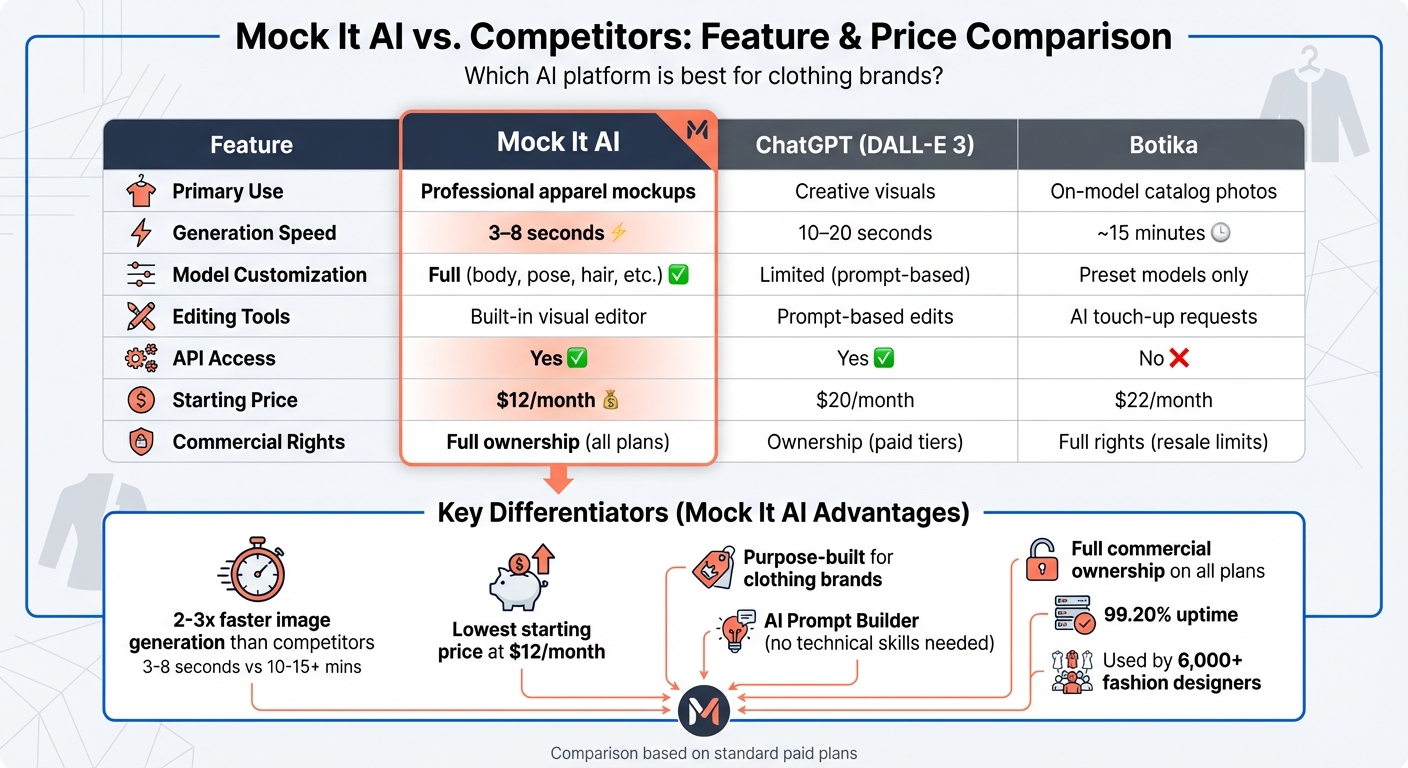
Mock It AI vs Competitors: Features and Pricing Comparison for Clothing Brands
When clothing brands evaluate AI mockup platforms, Mock It AI stands out with its apparel-focused workflows, faster image generation, more customization options, and lower pricing.
Feature and Price Comparison
Here’s a quick look at how Mock It AI stacks up against other major players in the generative AI space for clothing brands:
| Feature | Mock It AI | ChatGPT (DALL-E 3) | Botika |
|---|---|---|---|
| Primary Use | Professional apparel mockups | Creative visuals | On-model catalog photos |
| Generation Speed | 3–8 seconds | 10–20 seconds | ~15 minutes |
| Model Customization | Full (body, pose, hair, etc.) | Limited (prompt-based) | Only preset models available |
| Editing Tools | Built-in visual editor | Prompt-based edits | AI touch-up requests |
| API Access | Yes | Yes | No |
| Starting Price | $12/month | $20/month (Plus) | $22/month |
| Commercial Rights | Full ownership on all plans | Ownership on paid tiers | Full rights (resale limits) |
Source:
Mock It AI generates images up to 2–3 times faster than ChatGPT and significantly outpaces Botika, making it ideal for brands managing high-volume seasonal collections. This speed, paired with its apparel-specific features, ensures seamless integration into modern design workflows.
What Makes Mock It AI Different
Mock It AI doesn’t just rely on speed and affordability – it shines with its tailored design tools. Unlike general-purpose platforms, this tool is purpose-built for clothing brands. Its AI Prompt Builder eliminates the need for complicated text prompts by offering guided selections for model attributes, camera angles, and backgrounds. In contrast, competitors either require technical prompt-writing or restrict users to preset options.
"Mock It AI surpasses Botika in style flexibility by allowing fully adjustable models, scenes, and camera settings." – Jeremy P
This flexibility empowers brands to create AI-driven visuals directly within their creative processes. The platform also includes a professional editor with advanced features like background removal, object isolation, color grading, resolution upscaling, and selective area regeneration. These tools let users fine-tune specific parts of an image without needing to start over. In comparison, Botika only offers basic refinement requests, and ChatGPT requires additional prompt adjustments for edits.
Another major advantage? Mock It AI offers full commercial ownership across all paid plans. That means you can freely use your images in ads, NFTs, merchandise, or any other commercial project without attribution. With a 99.20% uptime and API access for bulk generation, it’s a go-to solution for agencies and e-commerce brands managing large-scale operations.
Mock It AI Pricing Plans
Mock It AI combines affordability and speed with flexible pricing options designed to suit every clothing brand’s needs.
The platform operates on a credit-based subscription system – one credit equals one image generation. Trusted by over 6,000 fashion designers and clothing brands globally, Mock It AI is known for its cost-effective and fast service.
Paid Plans Breakdown
Mock It AI offers three subscription tiers, each tailored to different production needs. All plans come with access to professional tools like 3D mapping, realistic textures, clipping masks, and custom model building. Plus, if you upgrade mid-month, unused credits roll over, and even if you cancel, you can still use remaining credits until the end of your billing cycle.
| Plan | Price | Credits Per Month | Cost Per Credit | Saved Mockups | Multiple Mockup Tabs |
|---|---|---|---|---|---|
| Starter | $12/month | 100 | $0.12 | 10 | Not included |
| Growth | $29/month | 250 | $0.116 | 25 | 5 |
| Pro | $69/month | 650 | $0.106 | 50 | 10 |
Across all plans, image generation takes less than 30 seconds, and you can download high-resolution PNGs in square (1024x1024px), portrait (1024x1536px), and landscape (1536x1024px) formats. These features make it easy for brands to integrate stunning product images into their creative workflows while keeping costs manageable.
Why Choose the Pro Plan
The Pro plan offers the lowest per-image cost at just $0.106, making it ideal for brands handling high-volume projects like seasonal collections or multiple campaigns. With 650 credits per month and the ability to work on 10 mockup tabs simultaneously, the Pro plan is designed to streamline workflows and accommodate heavy production demands.
For brands producing extensive catalogs or experimenting with various outfit combinations, the Pro plan ensures maximum efficiency while keeping expenses low. And if you run out of credits, you can upgrade instantly without losing your current credit balance.
How to Add Generative AI to Your Workflow
Integrating generative AI into your clothing brand’s daily operations can streamline tasks and open up more time for creative decision-making. The trick is figuring out where AI can eliminate bottlenecks while enhancing efficiency. Mock It AI fits seamlessly into your workflow, whether you’re a solo designer or managing a collaborative creative team. With its rapid design capabilities and cost-effective tools, you can incorporate AI into every stage of your creative process.
Add AI to Your Design Process
Kick off your design process with the AI Moodboard Generator, which helps you gather visual inspirations and establish a clear creative direction. Once you’ve set the mood, use the AI Fashion Design Generator to bring your ideas to life by simply inputting style preferences and fabric choices – no advanced skills required.
For prototyping, Mock It AI’s 3D Mapping and AI Virtual Dressing Room allow you to see how designs look and move on digital models, cutting out the need for physical samples. This not only speeds up iterations but also reduces sampling waste by nearly 60%. Features like Distortion replicate realistic fabric stretching, while Clipping Masks make it easy to fine-tune design elements.
"Mock It AI gave me consistent images without me having to learn Photoshop or pay someone. I’m still doing it myself, it just doesn’t look homemade anymore."
– Jamal R., Verified Subscriber
Create Marketing Content with AI
AI doesn’t stop at design – it can also transform your marketing efforts. Replace traditional photoshoots with custom digital models created in under 30 seconds. These models are fully customizable, letting you adjust features like ethnicity, age, pose, and expression. You can even choose specific camera lenses and set up tailored campaign environments.
For platform-specific content, Mock It AI offers various size options:
- Portrait (1024×1536px) for social media stories and eCommerce listings
- Square (1024×1024px) for Instagram feeds
- Landscape (1536×1024px) for website banners
The built-in Prompt Builder simplifies the creation process, making it accessible even for teams without professional photography or editing expertise.
"Mock It AI lets me bang out decent product pics in an hour and keep moving. It’s honestly just made my life easier."
– Sarah M., Verified Subscriber
Combine AI with Human Creativity
AI shines when it comes to repetitive tasks, but the magic happens when you pair it with human creativity. Start by defining your collection’s overall theme, mood, and seasonal direction to ensure a consistent vision. Use AI to generate bulk images or automate background changes, but rely on human designers for the final touches to meet commercial standards.
Clear and specific instructions are key to getting the best results. For example, instead of a vague prompt like "blue pants", try something more detailed: "navy wool crepe wide-leg tailored trousers with soft, directional morning light." Uploading your brand’s existing images can also help the system learn your aesthetic, ensuring a consistent look across all outputs.
Conclusion
Generative AI is changing the game for clothing brands by transforming how they design, prototype, and market their products. It slashes development time, reduces resource waste, and simplifies workflows for designers of all levels, making the creative process more efficient and accessible.
Mock It AI is a standout tool tailored specifically for the fashion industry. Unlike general-purpose image generators, this platform offers features like 3D mapping that realistically wraps designs around fabric folds using artistic shadows, a Prompt Builder to simplify creating professional visuals, and customizable models that eliminate the need for expensive photoshoots. With over 6,000 fashion designers and brands already using it, Mock It AI delivers stunning, studio-quality results in under 30 seconds.
Starting at just $12 per month for 100 credits, Mock It AI allows brands to experiment with colorways, backgrounds, and model variations – without the financial and logistical burden of traditional photoshoots. This makes it a practical choice for businesses at any stage of growth to create polished marketing content quickly and affordably.
The secret to getting the most out of AI lies in combining its efficiency with human creativity. AI can take over repetitive tasks like generating bulk mockups or testing design variations, leaving you free to focus on shaping your brand’s unique style. For example, detailed prompts like "navy wool crepe wide-leg tailored trousers with soft, directional morning light" will always yield better results than vague descriptions. This partnership between AI tools and creative vision drives innovation throughout the design process.
If you’re looking to accelerate your design workflow, cut costs, and produce marketing visuals that look professionally crafted, Mock It AI provides a comprehensive solution. As the fashion industry continues to embrace digital-first workflows, adopting AI tools now can give your brand a competitive edge in a market projected to reach $4.72 billion by 2032.
FAQs
What kinds of clothing images can Mock It AI generate?
Mock It AI produces a diverse array of clothing images tailored to the needs of fashion brands and designers. Whether it’s formal wear, casual outfits, streetwear, activewear, vintage pieces, or avant-garde styles, this tool has it covered. By leveraging detailed AI prompts, it fine-tunes elements like fabric texture, fit, lighting, and even the environment. This allows brands to visualize their designs without needing physical samples, simplifying both the design process and marketing efforts.
How do I get consistent on-brand results with Mock It AI?
To get consistently on-brand images with Mock It AI, start with clear and detailed prompts. Be specific about aspects like style, fabric, fit, lighting, and camera angles. Mock It AI’s prompt builder makes this process easier, helping you stay in control while reducing guesswork. Take time to review and tweak your prompts based on previous results to ensure your visuals stay cohesive and match your brand’s aesthetic.
What do I need to upload to create realistic mockups in Mock It AI?
To make realistic mockups with Mock It AI, simply upload your design or clothing image. The platform takes your input and creates custom, high-quality mockups and photoshoots that match your design, model, and preferences. This helps deliver one-of-a-kind, professional visuals for your brand.